


An Important Warning About the Future of Personal Technology
For decades, consumers have been used to a predictable pattern in technology. Computers became faster, cheaper, and easier to upgrade. When a system slowed down, replacing or upgrading it usually made sense. That expectation no longer matches reality, and this change is already affecting every person who uses technology.
The technology industry is undergoing a fundamental shift. Some of the largest hardware manufacturers in the world — including Samsung, SK hynix, Micron (the parent company of Crucial), and other major memory and storage producers — are increasingly focusing their production on large corporate customers. These customers include cloud providers, hyperscale data centers, and artificial-intelligence infrastructure projects. These sectors consume enormous amounts of memory and storage and are far more profitable than the consumer market.
As a result, everyday consumer devices are no longer the primary focus. Memory, storage, and component supply that once went into laptops, desktops, phones, and tablets is now being redirected toward data centers designed to extend AI capabilities. This is not speculation. It is visible in pricing, availability, and the way new devices are being designed and sold.
This affects everyone. Laptops, desktop computers, phones, tablets, and nearly every modern household device rely on the same underlying components. When manufacturers prioritize enterprise and AI customers, fewer resources are allocated to consumer products. That means higher prices, fewer configuration options, and increasingly limited devices.
At the same time, device design has changed. Many modern laptops and tablets ship with memory soldered directly to the motherboard, storage that cannot be replaced, batteries that are glued in place, and proprietary components that are difficult or impossible to source. When one of these parts fails or becomes insufficient, the entire device may need to be replaced. This is not a short-term design trend. It is a deliberate move toward sealed, non-serviceable hardware.
These are not normal seasonal price swings. They reflect a market where consumer needs are being deprioritized. As memory and storage costs rise, the price of entire devices rises with them. New laptops and phones may ship with less RAM, less storage, and fewer features — while costing more than older models.
This has serious implications. Most people will be using their current devices for far longer than they expected. Replacement will no longer be casual or inexpensive. Taking care of existing technology is no longer optional — it is essential.
What You Should Do Now
Before replacing a computer, it is important to understand why so many devices now feel harder to live with or fail earlier than expected. The way modern hardware is designed, manufactured, and prioritized has changed. Keeping and maintaining existing devices is often the smarter choice.
If your computer still turns on reliably and performs the tasks you need, replacement should not be your first instinct. Many systems that feel “old” are slowed by fixable problems such as worn storage, software clutter, overheating, or battery degradation. Addressing these issues can restore performance and extend usable life at a fraction of the cost of replacement.
Upgrades should be deliberate. Adding memory only makes sense when a system is genuinely running out. Replacing failing storage often delivers the biggest improvement. Chasing specifications or marketing claims rarely provides lasting value.
Maintaining existing hardware matters more now than ever. Cleaning, cooling, sensible updates, and timely battery replacement can prevent expensive failures later. Small preventative steps taken early often determine whether a device lasts months or years.
Older computers deserve special consideration. If a system still powers on and uses standard, replaceable components, it may be worth keeping even if it is not currently in daily use. In a market where new devices are increasingly sealed and limited, flexible older hardware may become more valuable, not less.
Replacement is sometimes unavoidable. When a motherboard has failed, parts are unavailable, security updates have ended, or repair costs exceed realistic value, moving on makes sense. The key is making that decision based on facts rather than pressure or fear.
At Tech Bench Advisor LLC, our role is to help customers navigate these changes honestly. Sometimes that means recommending repair or targeted upgrades. Sometimes it means explaining clearly when replacement is the only option. Our goal is not to sell the most hardware, but to help you preserve reliability, value, and control over your technology.
The coming years will reward careful decisions rather than constant upgrades. Treating devices as long-term tools, backing up data consistently, maintaining hardware properly, and avoiding unnecessary replacements will save money and reduce frustration. Technology will continue to advance, but consumer flexibility is becoming rarer.
If you are unsure what makes sense for your device, we are here to help. A clear explanation today can prevent a costly mistake tomorrow.
Backup, Backup, Backup — This Is the Most Important Thing You Can Do
If there is one action that matters more than any other right now, it is this: back up your data. As memory and storage prices rise and repairs become more expensive, losing data can cost far more than most people realize. Backups protect not just files, but time, money, and peace of mind.
Right now, backup storage such as USB flash drives, SD cards, and external hard drives is still relatively affordable. This may not remain the case. We have already seen how quickly prices can change with memory, and storage can follow the same pattern as manufacturers prioritize enterprise customers. Acting now, while backup options are still reasonably priced, is one of the smartest steps you can take.
If a device’s storage fails, if memory is damaged, or if a system suffers electrical or liquid damage, the cost to repair or recover data may be significantly higher than it is today. In some cases, replacement parts may be difficult to source at any price, and professional data recovery can cost far more than a simple backup ever would have.
Every household should take time to understand what devices they own and how to protect them. Start by identifying the devices you rely on daily — laptops, desktops, phones, tablets — and assume you may need to keep them much longer than planned. If a device is a laptop or desktop, regular servicing matters. Dust buildup, clogged fans, and poor airflow cause heat, and heat shortens the life of every internal component. A basic internal cleaning is usually inexpensive and can extend a system’s life by years.
Once a device is clean and running properly, choose a backup method. An external hard drive, USB flash drive, or SD card used specifically for backups is often enough for most households. The most important rule is that the backup exists outside the device itself. If something happens to the computer, your data should already be safe somewhere else.
How you use your device also affects how long it lasts. Avoid leaving computers and laptops running overnight when they are not needed. Powering devices down reduces heat, electrical stress, and long-term wear. This is especially important for systems you plan to keep for many years.
It helps to understand how modern storage works. Think of an SSD like a very large notebook made up of thousands of pages. Each page can only be erased and rewritten a certain number of times. However, the SSD is smart. Instead of using the same page repeatedly, it spreads writing evenly across all the pages. This process means that even daily use only lightly wears many pages instead of destroying one spot.
Because of this design, modern SSDs are rated for hundreds of terabytes of total writing, which for normal use usually means many years of reliable operation — often longer than the computer itself. Still, unnecessary background activity, constant overnight operation, and avoidable write-heavy tasks add wear over time. Sensible use helps devices last longer.
Liquid damage is another serious risk. Even small spills can damage storage or cause slow corrosion that leads to failure weeks or months later. As repair and recovery costs rise, liquid damage can turn a usable system into a total loss far more quickly than it once did.
It is also important to understand that newer devices are not guaranteed to be better. Many new laptops, phones, and tablets ship with less memory, less storage, fewer features, and no upgrade options compared to older models. In some cases, an older, well-maintained device may be more capable and more reliable than a brand-new one.
Backing up data, servicing devices regularly, using them carefully, and maintaining them properly are no longer optional habits. They are essential steps in a world where replacement is more expensive, repairs are harder, and flexibility is disappearing.
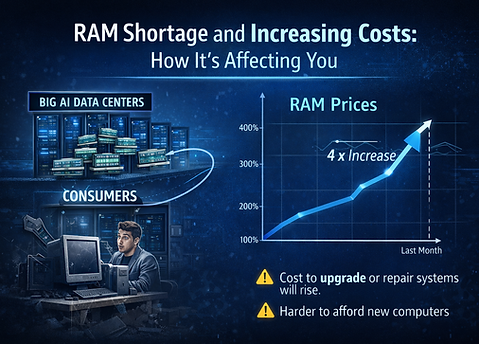
Ironically, this means that older devices are becoming more
valuable, not less. Many computers from just a few years ago
still allow memory upgrades, storage replacements, battery
changes, and affordable repairs. These systems often offer
more flexibility, more usable storage, and more long-term
value than newer devices sold today. In some cases, an older,
well-maintained computer may actually be more capable than
a brand-new one.
One of the clearest warning signs of this shift is the rapid
increase in memory and storage prices. In a very short period
of time, RAM pricing has risen dramatically as large
data-center and AI customers absorb available supply. As an
example, 32 GB of memory that could be purchased for
under $100 just a few months ago can now cost $300 to $350
or more. These changes happened quickly, and similar
pressures are already affecting storage prices.